The Database Portability Platform

Move Enterprise Databases Across Clouds and Platforms

Migrate databases between SQL Server, Azure, AWS, PostgreSQL, MySQL, Oracle, and modern data platforms — with parallel data movement, checkpoint resume, continuous sync, and built-in validation.

🔒 Your data stays in your environment  •  Self-hosted  •  Air-gap capable

Build the Bridge Between Your Databases

Connect Analyze Migrate Sync Validate

One platform for complex enterprise database migrations across cloud, on-premises, and hybrid environments.

13+ Database & Data Platform Integrations
7 Cloud Export Destinations
100GB–1TB+ Scale Tested
0 Cloud Agent Required

Your Data. Your Infrastructure. Your Control.

Unlike SaaS migration services that require uploading your credentials to a third-party cloud, Endrias Bridge runs entirely on your own infrastructure. Data never leaves your environment.

SaaS Migration Tools Typical cloud-based migration services
Your credentials and data pass through a third-party cloud platform
Requires internet connectivity and a cloud agent to operate
Per-row or per-hour pricing that scales with your data volume
Cannot run in air-gapped, HIPAA, or PCI-restricted environments
Limited engine support — often SQL Server and MySQL only
Black-box execution — no visibility into what runs on your data
Endrias Bridge Self-hosted · Any cloud · Any VM · Docker
Data never leaves your environment. Run on-prem, in your VPC, or on any cloud VM you control
Air-gap capable. No internet required to run. Works in isolated networks, secure data centers, and offline labs
Flat annual pricing. Migrate 100 GB or 10 TB — same price. No per-row, per-hour, or per-engine fees
Designed for regulated environments. Self-hosted execution and customer-controlled infrastructure help organizations maintain control over database credentials, network paths, and migration data
15+ engines. SQL Server, Azure SQL, Azure Synapse Analytics, AWS RDS, PostgreSQL, MySQL, Oracle, MongoDB, Redis, Cosmos DB, Snowflake, Databricks, and more
Full transparency. Open execution logs, validation reports, and checkpoint state — you see everything that runs

Three Enterprise Problems, One Platform

Moving data is only step one. Endrias Bridge is built around the three problems enterprise migrations actually run into: moving the data correctly, keeping it in sync until cutover, and giving the team visibility and control the whole way through.

Migration Engine

Get the data across correctly the first time.

🔄

Schema Conversion

Auto-maps data types across engines. TINYINT, MEDIUMINT, DATETIME, ENUM, BLOB — all handled. Indexes, constraints, and foreign keys recreated on target with full fidelity.

Parallel Data Copy

Configurable parallel migration workers split large tables into PK-range segments and copy them concurrently — full use of available bandwidth without hand-tuning batch sizes.

Checkpoint Resume

Resume from exactly where you left off. PK-range chunking means never restarting from row 0 after a network blip, maintenance window, or unexpected interruption.

🔗

FK Cycle Detection

Automatically detects circular foreign key dependencies (staff↔store pattern). Drops all FKs before bulk copy, recreates them cleanly after — no constraint violations.

Built-in Validation

Row counts, unique constraint checks, index verification, and spot-check queries — all run automatically and exported to a detailed HTML validation report.

Continuous Migration

Keep source and target in sync until you're ready to cut over.

📡

CDC Streaming

SQL Server change-data-capture streams inserts, updates, and deletes to the target continuously after the initial copy — target stays current, not just a point-in-time snapshot.

📋

CDC Event Viewer

Capture INSERT, UPDATE, and DELETE events per table in real-time during CDC streaming. Color-coded event log with filter, pause, and export — see exactly what's changing and when.

🔁

Continuous Sync

Where native CDC isn't available, checkpoint-based watermark sync keeps the target current on a schedule — so every engine gets a path to low-downtime cutover, not just SQL Server.

🗄️

Low-Downtime Cutover

Promote a synced read replica or target database when you're ready — AWS RDS for SQL Server (same-region and cross-region) and Azure SQL geo-replicas, with no console-switching required.

Enterprise Operations

Give the team visibility and control over what's running.

📊

Real-Time Health Monitor

Live KPI cards, throughput sparklines, CPU/Memory/Network/Disk charts, per-table progress bars, and an activity log — updating every second while a migration runs.

AI Compatibility Analysis

Automated pre-migration assessment scores your schema for target compatibility. Flags data type mismatches, unsupported features, and circular FK dependencies before migration starts — not after.

🔄

Read Replica Manager

Create, monitor, and promote read replicas directly from the GUI — no separate cloud console required to manage the replicas your migration depends on.

📈

Enterprise Reporting

Exportable migration reports track progress, validation results, throughput, and errors per table and per run — the record you hand to a change-control board or an auditor.

☁️

Cloud Export Destinations

Export migrated data directly to Amazon S3, Amazon Redshift, Azure Event Hub, Azure Blob Storage, Snowflake, Google BigQuery, and Aurora PostgreSQL — no intermediate steps.

Air-Gap Capable

Runs completely offline. No telemetry, no cloud agent, no license server call-home. Fully operational in air-gapped data centers, secure VPCs, and isolated networks.

📦

One-Click Installer

EndriasBridge_Setup.exe bundles Microsoft ODBC Driver 18. Install on any Windows 10/11 or Server 2019/2022 machine in under 2 minutes. No prerequisites to hunt down.

Real-Time Migration
Health Monitor

Watch every table, every row, and every byte move in real time. The Health Monitor tab updates every second — giving you full visibility into what's happening inside your migration without leaving the tool.

Throughput sparklines, per-table progress bars, a donut chart of table status, and system resource charts (CPU, memory, network, disk) are all built in.

122
TABLES COMPLETED
52,433
ROWS / SEC
45.2M
TOTAL ROWS COPIED
95%
MIGRATION COMPLETE

Illustrative migration dashboard — actual throughput and duration vary by environment, network, and dataset.

Migration Health Monitor (demo environment) ● Running
128
TABLES TOTAL
122
COMPLETED
6
IN PROGRESS
0
ERRORS
45.2M
ROWS COPIED
52,433
ROWS / SEC
01:14:22
ELAPSED TIME
00:08:43
EST. TIME LEFT
TABLE STATUS
95% DONE
Completed · 122
In Progress · 6
Pending · 0
Failed · 0
PER-TABLE PROGRESS
Claims100%
OrderHeader100%
Transactions78%
AuditLog61%
Labels100%
Products100%
THROUGHPUT — ROWS/SEC · LAST 60s

Works Across Every Major Platform

Heterogeneous and homogeneous migrations — on-prem, PaaS, and cloud-native.

Source Databases
SQL Server Azure SQL PostgreSQL MySQL / MariaDB Oracle
Endrias Bridge Migration Engine
Schema Analysis Parallel Copy Checkpoint Resume Continuous Sync Validation
Target Platforms
AWS RDS Azure SQL Cloud SQL PostgreSQL / MySQL MongoDB / Snowflake
PlatformSourceTargetCDC
SQL Server
Azure SQL Database / Managed Instance
AWS RDS for SQL Server
Azure Synapse Analytics (SQL Pool)✅*
PostgreSQL
MySQL / MariaDB
Oracle
MongoDB / Cosmos DB
Redis
Apache Cassandra
Elasticsearch
Snowflake
Databricks (SQL Warehouse)

CDC (native change-data-capture streaming) is currently SQL Server–family only; other engines use checkpoint-based watermark / full-copy sync. DynamoDB source support is planned for a future release. *Azure Synapse Analytics CDC/incremental sync is available but not yet as extensively validated as SQL Server/Azure SQL — Full Copy is the recommended mode for a first migration.

Watch Endrias Bridge in Action

Real-time migration monitoring, CDC event capture, checkpoint resume, and cloud export — all in one tool.

Export to Any Cloud

Push migrated data directly to your cloud analytics, storage, and streaming platforms — no extra tooling needed.

🟠
Amazon S3
Bulk export to S3 buckets for data lake ingestion
🔴
Amazon Redshift
Direct load into Redshift clusters via COPY
🔵
Azure Event Hub
Stream CDC events to Azure Event Hub in real-time
🔷
Azure Blob Storage
Export to Azure Blob for archiving and ETL pipelines
❄️
Snowflake
Load into Snowflake warehouses via SQLAlchemy dialect
🔵
Google BigQuery
Export structured data to BigQuery datasets
🟠
Aurora PostgreSQL
Migrate or replicate directly to Aurora Serverless

Three Steps to a Clean Migration

1

Connect

Enter source and target connection details. Supports Windows Auth, SQL Auth, SSL/TLS, and connection profiles saved locally — no credentials stored in the cloud.

2

Configure

Choose tables, schemas, migration mode (Full Copy / Resume / CDC Incremental), batch size, parallelism, and validation options — all from a clean UI.

3

Migrate

Monitor live row counts, index rebuild status, and FK recreation in the log panel. Export a full HTML report when complete — ready for sign-off.
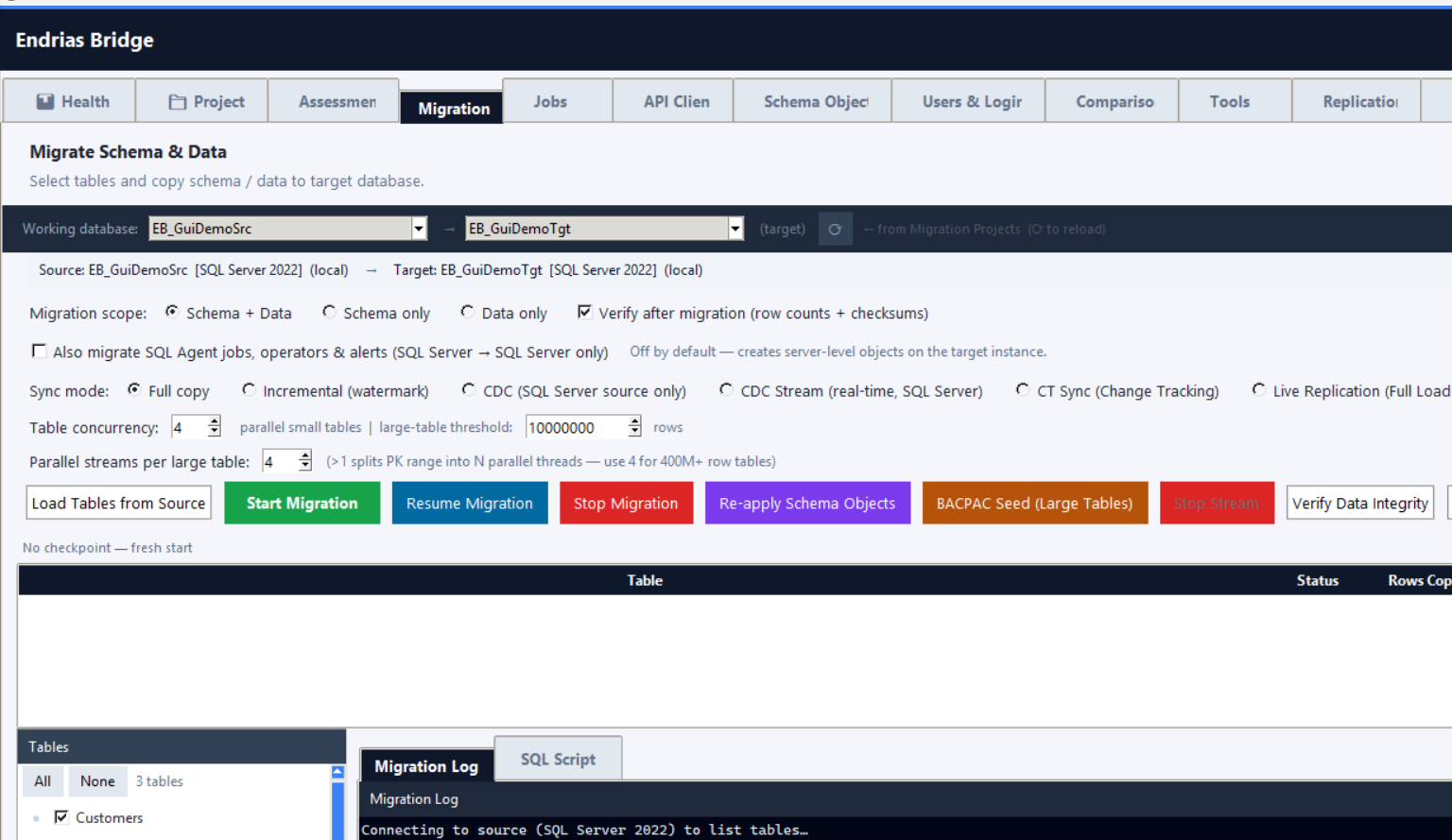
Endrias Bridge Migrate tab showing source/target databases, migration scope, sync mode, and table selection
The Migrate tab — pick source/target, migration scope, sync mode (Full Copy, Incremental, CDC, Live Replication), and tables, then start.
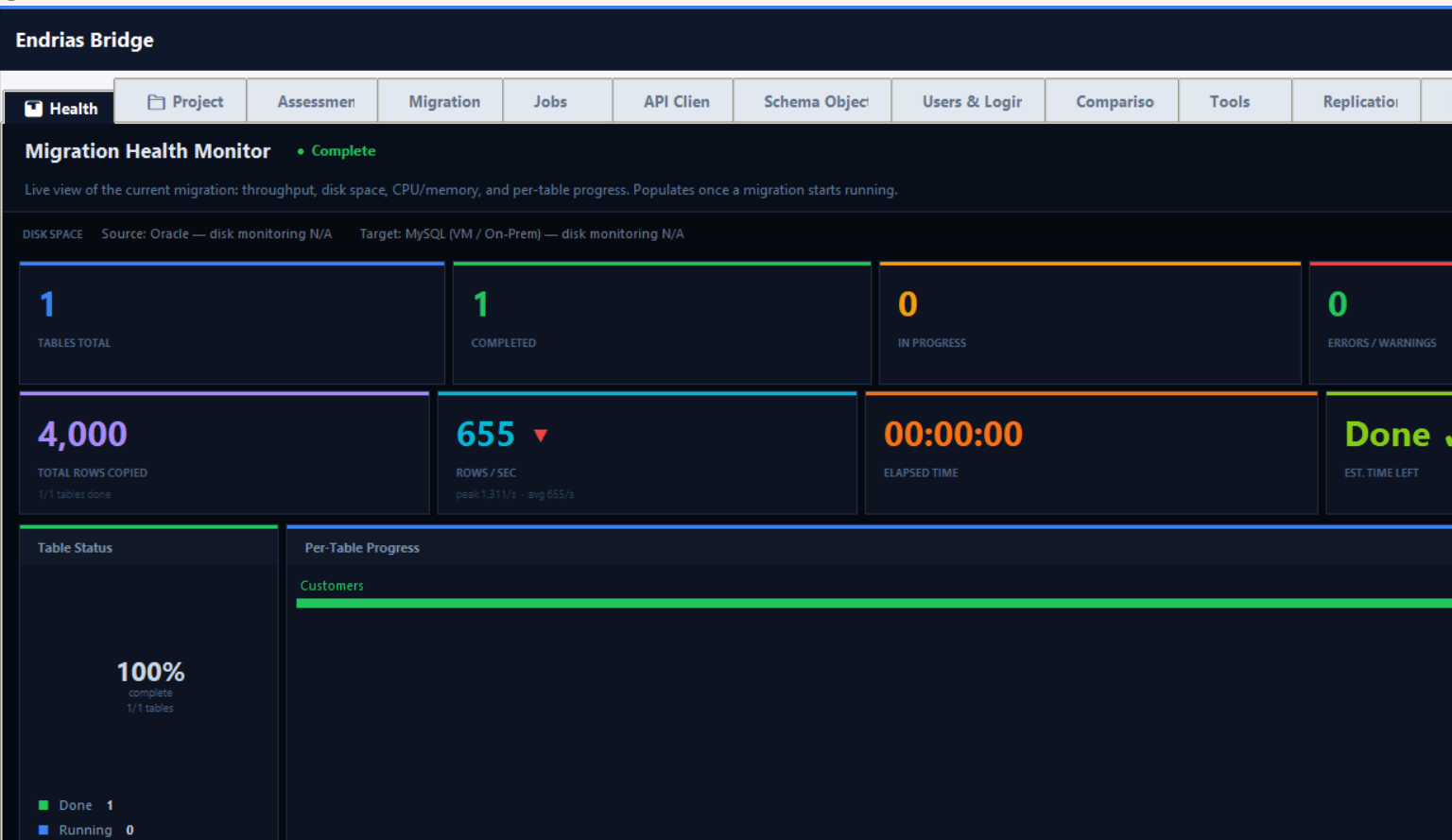
Endrias Bridge Migration Health Monitor showing five tables migrating live, with per-table progress, elapsed time, and throughput
The Migration Health Monitor — live per-table progress while a migration runs, whether started from the desktop app or the REST API.

Built for Production Scale

Right-size your migration host to meet your window. Tested from dev databases to multi-terabyte enterprise workloads.

Tier 1 — Small
<10 GB
RAM8 GB
CPU4 vCPUs
Network100 Mbps
Est. Window<1 hour
Tier 2 — Medium
10–100 GB
RAM16 GB
CPU8 vCPUs
Network1 Gbps
Est. Window2–8 hours
Tier 3 — Large
100 GB–1 TB
RAM32 GB
CPU16 vCPUs
Network10 Gbps
Est. Window8–48 hours
Tier 4 — XL
1 TB+
RAM64 GB+
CPU32+ vCPUs
Network10–25 Gbps
Est. WindowPlan & validate

Migrating many databases at once? The tiers above assume one migration host running one job. Teams migrating dozens or hundreds of databases concurrently (e.g. a full estate cutover) should run Endrias Bridge from a dedicated EC2 or Azure VM in the same region/VPC as the target — not a laptop. A shared laptop's network and CPU become the bottleneck once more than a couple of jobs run side by side, independent of how fast the tool itself processes rows. See concurrent multi-database sizing →

Simple, Transparent Pricing

Try every feature free for 14 days. Starter, Professional, and Enterprise tiers — flat annual pricing, no per-row charges.

See Full Pricing & Compare Plans  →
About

Built by SQL Engineers, for DBAs

Endrias Bridge was built from real migration pain: failed tools, incomplete schema mappings, and no good way to resume after an outage at 2 AM. Every feature in this tool was designed to solve an actual production problem — not a theoretical one.

No SaaS overhead, no third-party credential uploads, no per-row pricing. Your data stays in your environment, always.

Learn More  →
EB
Endrias Bridge
Enterprise Migration Platform
Build the Bridge Between Your Databases