REST API Client (Headless / Automated Migrations)
Step-by-step procedure for starting and monitoring a migration job through the REST API instead of the migration wizard — the path for CI/CD pipelines, scheduled jobs, and any script that needs to kick off a migration without a human clicking through Step 5.
Overview & Scope
Endrias Bridge
ships a local REST API (migrationbridge api) alongside
the desktop wizard. It runs the exact same migration engine — same
schema copy, same parallel data copy, same same-engine-family
views/procedures/triggers step — just triggered by an HTTP request
instead of a button click. There are two ways to drive it:
/docs, and can
be called directly with curl/requests/any
HTTP client — see the curl
reference below.Endpoints Reference
| Endpoint | What it does |
|---|---|
GET /health | Liveness check — returns {"status": "ok"} if the server is up. |
POST /replications | Start a migration job from a connection-string JSON body. Returns a job_id immediately (202 Accepted) — the job runs in the background. |
GET /jobs | List every job the server knows about (this process's lifetime only — no persistence across restarts). |
GET /jobs/{job_id} | Poll one job's state (queued/running/done/failed/stopped), progress %, full log, and final report. |
DELETE /jobs/{job_id} | Request cancellation of a running job (also usable via the native POST /jobs EB-native job format — /replications jobs share the same store). |
Prerequisites
| Requirement | Notes |
|---|---|
| Endrias Bridge desktop app installed (or the Python package on a server) | The API server is part of the same install — no separate download. |
fastapi and uvicorn installed | pip install "fastapi>=0.110" "uvicorn[standard]>=0.28" if running the CLI standalone. The desktop app's Start API Server button installs/uses the same environment it's already running in. |
| Source and target SQL Server connection details on hand | Host, port, database, username, password for both sides — the same details Step 5 of the wizard asks for. |
Start the API Server
From the desktop app: open the API Client
tab, set a port (default 8765), and click
Start API Server. The status label turns green
(Running on http://localhost:8765) once it responds to
a health check — usually under two seconds.
From a terminal (useful for a server/CI box with no GUI at all):
python -m migrationbridge api --port 8765127.0.0.1
by default (this machine only) and every endpoint except
GET /health needs Authorization: Bearer <token>.
The token is read from the EB_API_TOKEN environment variable,
then api_token in migrationbridge.conf, then
%APPDATA%\EndriasBridge\api_token.txt (created on first start).
The desktop app's API Client tab sends it for you. Use
--host 0.0.0.0 only when remote scripts need to call it, and
keep the port off the public internet.Open the API Client
Once the status label shows Running, you have two equivalent ways to send requests:
- Stay in the desktop app's API Client tab — pick an action from the dropdown, edit the JSON, click Submit Request.
- Click Open /docs (Swagger UI) to launch the full interactive API explorer in your browser — every endpoint, schema, and a "Try it out" button per action.
Submit a Start Replication Request
Select Start Replication — POST /replications from
the API Action dropdown. The Request pane pre-fills a template —
edit the two connectionString values for your real
source and target:
{
  "source": {
    "connectionString": "Data Source=HOST,1433;Initial Catalog=DB;User ID=USER;Password=PASSWORD;Encrypt=True;TrustServerCertificate=True",
    "encryptDataInTransit": "True",
    "changeTrackingMethod": "ChangeDataCapture",
    "changeTrackingRetentionPeriod": "3 DAYS"
  },
  "destination": {
    "connectionString": "Data Source=HOST,1433;Initial Catalog=DB;User ID=USER;Password=PASSWORD;Encrypt=True;TrustServerCertificate=True",
    "encryptDataInTransit": "True"
  },
  "replicationName": "my-job",
  "replicationMethod": "OneTime",
  "bulkCopyBatchSize": "100000",
  "parallelTablesLimit": "4",
  "pkRangeStreams": "4",
  "replicateTablesOnly": "False",
  "replicateViews": "True",
  "replicateStoredProcedures": "True",
  "replicateLoginsUsersAndRoles": "False",
  "addSourceObjectsToExclusionList": { "tables": "", "views": "", "storedProcedures": "" },
  "addNewTablesToExclusionList": "False",
  "dynamicTablesExclusionRules": "",
  "stagingBufferType": "TempDb"
}
Faster alternative to hand-typing connection strings:
the API Client tab has the same Working database
picker every other tab uses, fed by the active Migration Project's
configured source/target databases. Pick a database pair there,
then click Fill from Selected Project to build both
connectionString values automatically instead of typing
them by hand — only the job-level options (parallelTablesLimit,
exclusions, etc.) are left for you to adjust.
changeTrackingMethod is informational only — this
endpoint always performs a one-time full seed regardless of what's
set here. changeTrackingRetentionPeriod (e.g.
"3 DAYS") is applied for real, but not until the
stream actually starts: it's carried on the seed job and applied
via sp_cdc_change_job when you later call
POST /replications/{job_id}/stream (Step 5) — the
connecting login needs db_owner on the source for that call to
succeed; if it doesn't, the stream still starts, with a warning
in its log instead of the retention change. Once the seed job
reaches state done, call Step 5 to start continuous
CDC streaming for cutover.
Click Submit Request. The Response pane returns
immediately with a job_id — the migration itself keeps
running in the background:
HTTP 202

{
  "job_id": "b6ac19bf-f16b-48d1-963d-25d7cfff37a8",
  "replicationName": "my-job",
  "resume": false,
  "notes": []
}notes array means part of the request
was accepted but isn't wired up yet (e.g. requesting continuous
CDC, or a login/role replication flag) — read it, it tells you
exactly what didn't happen and why. See
Known Limitations.Migrating multiple databases in one request
Add a databases list to migrate several databases from
the same source server to the same target server in one call — one
job is started per database, mirroring what the desktop app's
Projects tab does for a batch. When set, the Initial
Catalog in both connection strings is ignored and replaced
with each name in the list:
{
  "source": {"connectionString": "Data Source=src-host,1433;Initial Catalog=ignored;User ID=USER;Password=PASSWORD;Encrypt=True;TrustServerCertificate=True"},
  "destination": {"connectionString": "Data Source=tgt-host,1433;Initial Catalog=ignored;User ID=USER;Password=PASSWORD;Encrypt=True;TrustServerCertificate=True"},
  "replicationName": "batch-job",
  "databases": ["Sales", "Inventory", "Billing"]
}
The response returns a map instead of a single ID — poll each one individually with Job Status:
{
  "job_id": null,
  "job_ids": {"Sales": "...", "Inventory": "...", "Billing": "..."},
  "replicationName": "batch-job",
  "resume": false,
  "notes": []
}databases uses
the same name on both sides.Migrating several differently-named databases (separate calls)
The databases list only helps when every database keeps
the same name on both source and destination. When
source/destination database names don't match per pair — a common
real-world shape, e.g. environment-suffixed database names —
submit one independent POST /replications call per
database instead, each with its own full connection strings:
{
  "source": {"connectionString": "Data Source=src-host,1433;Initial Catalog=db1;User ID=USER;Password=PASSWORD;Encrypt=True;TrustServerCertificate=True"},
  "destination": {"connectionString": "Data Source=tgt-host,1433;Initial Catalog=z1;User ID=USER;Password=PASSWORD;Encrypt=True;TrustServerCertificate=True"},
  "replicationName": "db1-to-z1"
}
{
  "source": {"connectionString": "Data Source=src-host,1433;Initial Catalog=db2;User ID=USER;Password=PASSWORD;Encrypt=True;TrustServerCertificate=True"},
  "destination": {"connectionString": "Data Source=tgt-host,1433;Initial Catalog=z2;User ID=USER;Password=PASSWORD;Encrypt=True;TrustServerCertificate=True"},
  "replicationName": "db2-to-z2"
}
{
  "source": {"connectionString": "Data Source=src-host,1433;Initial Catalog=db3;User ID=USER;Password=PASSWORD;Encrypt=True;TrustServerCertificate=True"},
  "destination": {"connectionString": "Data Source=tgt-host,1433;Initial Catalog=z3;User ID=USER;Password=PASSWORD;Encrypt=True;TrustServerCertificate=True"},
  "replicationName": "db3-to-z3"
}
Each call returns its own independent job_id — track
and poll them separately, same as any single-database request. This
is also the right pattern when source and destination are the same
server pair for every database but you want per-database control
over options like replicateTablesOnly or table
exclusions, since databases mode applies the same
options to every entry in the list.
POST /replications calls fired concurrently (one per
database, distinct source and destination names per pair) all
completed successfully with no cross-contamination — each target
database ended up with exactly its own source database's rows,
nothing else's. Confirmed August 11 2026.Poll Job Status
Copy the job_id from Step 3 into the Job ID
field, switch the API Action dropdown to Job Status — GET
/jobs/{job_id}, and click Submit Request
again — repeat every few seconds until state is
done or failed.
| state | Meaning |
|---|---|
queued | Accepted, hasn't started on its worker thread yet. |
running | In progress — check progress (0–100) and the tail of log. |
done | Finished with no table-level errors. |
failed | Finished, but at least one table (or the job itself) hit an error — see report.results for which. |
stopped | Cancelled via DELETE /jobs/{job_id} before it finished. |
Resuming an interrupted job (crash, power loss, closed window)
If the machine running migrationbridge api loses power, the
process gets killed, or the window it was running in gets closed, the
job dies — but its progress isn't lost. Each table's PK-range checkpoint
is written to disk after every committed batch, not held only in
memory, so it survives the process itself dying.
- Start
migrationbridge apiagain (or the desktop app's API Client tab → Start API Server) — the oldjob_idis gone along with the process; that's expected, checkpoints don't depend on it. - Resubmit the exact same request you used originally
— same source database name(s), same target host/database — with
"resume": trueadded:
{
  "source": {
    "connectionString": "Data Source=HOST,1433;Initial Catalog=DB;User ID=USER;Password=PASSWORD;Encrypt=True;TrustServerCertificate=True",
    "encryptDataInTransit": "True",
    "changeTrackingMethod": "ChangeDataCapture",
    "changeTrackingRetentionPeriod": "3 DAYS"
  },
  "destination": {
    "connectionString": "Data Source=HOST,1433;Initial Catalog=DB;User ID=USER;Password=PASSWORD;Encrypt=True;TrustServerCertificate=True",
    "encryptDataInTransit": "True"
  },
  "replicationName": "my-job",
  "replicationMethod": "OneTime",
  "bulkCopyBatchSize": "100000",
  "parallelTablesLimit": "4",
  "pkRangeStreams": "4",
  "replicateTablesOnly": "False",
  "replicateViews": "True",
  "replicateStoredProcedures": "True",
  "replicateLoginsUsersAndRoles": "False",
  "addSourceObjectsToExclusionList": { "tables": "", "views": "", "storedProcedures": "" },
  "addNewTablesToExclusionList": "False",
  "dynamicTablesExclusionRules": "",
  "stagingBufferType": "TempDb",
  "resume": true
}
The response echoes "resume": true back immediately, so
you can confirm at submission time — before waiting for the job to
reach done — that it was accepted as a resume rather
than silently treated as a fresh start:
{
  "job_id": "9f2a7c1e-...",
  "replicationName": "my-job",
  "resume": true,
  "notes": []
}
This is the same full request you'd use to start the job — every
field carries over unchanged, with "resume": true added
at the end. source, destination, and
replicationName must be byte-for-byte identical to the
original submission (see the warning below); the rest of the
options don't affect checkpoint lookup and can differ if needed.
In databases batch mode, add "resume": true at
the top level alongside "databases": [...] — it applies to
every database in the list. Confirm it actually took effect by checking
the new job's log for [info] Resuming from checkpoint
(rather than [info] Cleared checkpoint file for fresh start,
which means it started over).
resume: true
is harmless for them — they just run as if it were a fresh
submission.SKIPPED — FK parent table(s) failed to
copy (...); will be picked up on next Resume. That's
expected: fix whatever made the parent fail (check its own log
line above the SKIPPED one), then resubmit with
"resume": true again and the skipped child will be
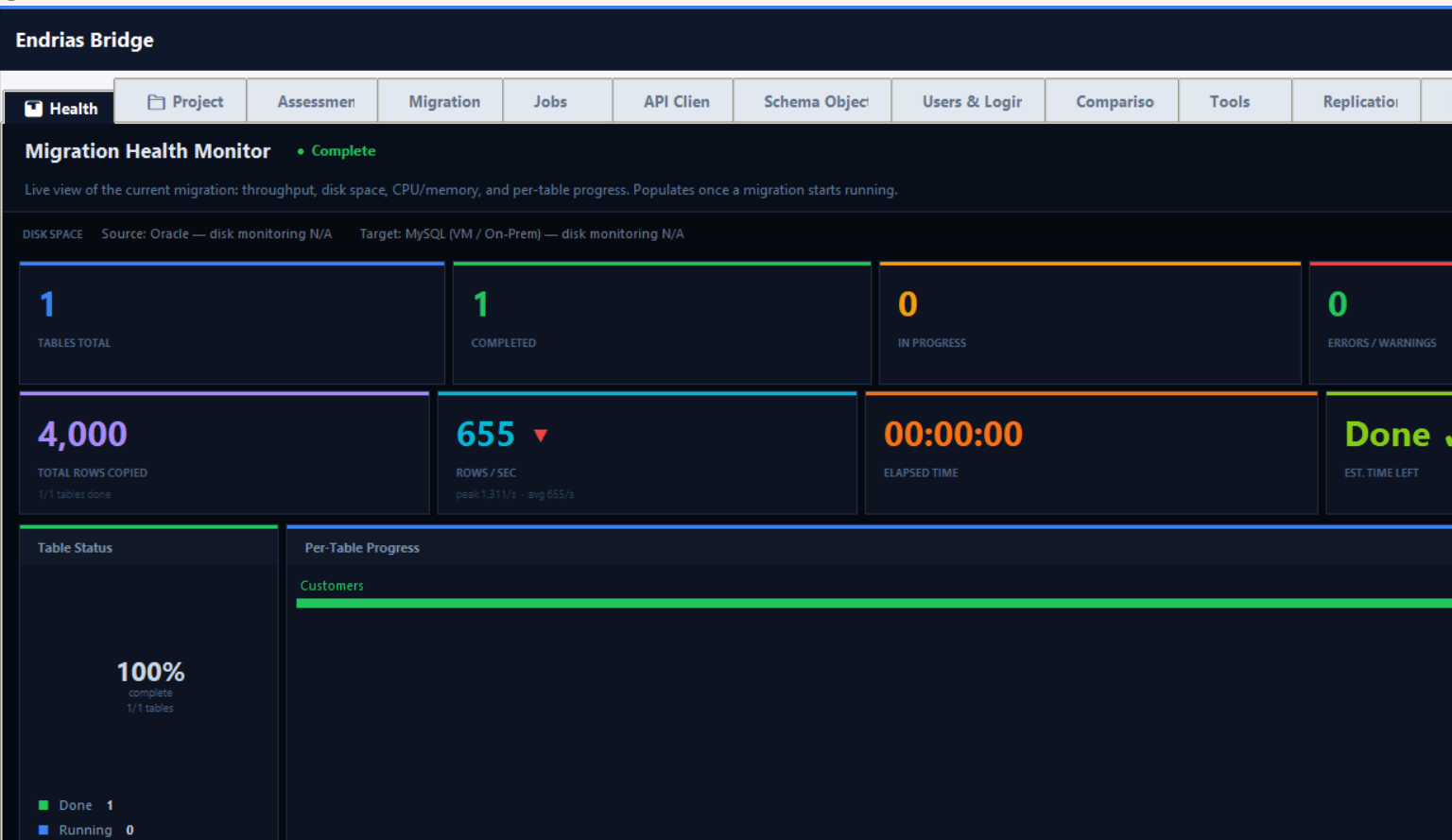
retried along with it.Watch It Live on Migration Health
While a job is running, switch to the desktop app's
Migration Health tab — it shows the same live
per-table progress dashboard whether the migration was started from
the Migrate tab or, like here, the REST API. No extra setup: the
dashboard polls the local API server automatically whenever it's
running.
Read the Result
The full response includes log (every line the
migration engine printed, same content you'd see in the wizard's
Migration Log tab) and report (structured per-table
results). For a script, the useful check is usually:
import json, urllib.request

with urllib.request.urlopen(f"http://localhost:8765/jobs/{job_id}") as r:
    d = json.load(r)

if d["state"] == "failed":
    errors = [x for x in d["report"]["results"] if x["status"] == "error"]
    raise SystemExit(f"{len(errors)} table(s) failed: {errors}")
Continuous CDC streaming after the seed
Once a seed job reaches state: "done", start
continuous CDC streaming for that same source/target pair with
POST /replications/{job_id}/stream — no
request body needed. This requires CDC enabled on the source
tables (EXEC sys.sp_cdc_enable_db, then
EXEC sys.sp_cdc_enable_table ... @supports_net_changes = 1
per table — tables without it are skipped and logged, not an
error):
curl -X POST -H "Authorization: Bearer $EB_API_TOKEN" http://localhost:8765/replications/<job_id>/stream
# -> {"stream_job_id": "...", "notes": []}
The stream is tracked as its own job — poll
GET /jobs/{stream_job_id} the same way, except
it stays in state running indefinitely (it doesn't
resolve to done on its own). The log shows applied
changes as they happen:
CDC: 3 change(s) applied (total 3), rate 0.5/s, LSN 0000002d000006180003Stop it with DELETE /jobs/{stream_job_id} —
but only once lag is at zero, per the cutover procedure below.
Stopping earlier means whatever changes hadn't been applied yet are
lost, same as stopping the desktop app's CDC Stream early.
MigrationBridge_LiveMigration_Runbook.html
(Pre-Cutover Checklist → Execute Cutover →
Post-Cutover Validation). That part is deliberately not automated
here — stopping application writes and flipping connection
strings happen outside the database tool, on infrastructure this
tool doesn't control.Stop the Job / Server
To cancel a running job early: select Stop Job — DELETE /jobs/{job_id} with the Job ID filled in, and submit. To shut the server down entirely, click Stop API Server in the desktop app (or Ctrl+C the terminal if you started it from the CLI). Closing the desktop app also stops any server it started, so you don't end up with an orphaned background process.
Review the API Logs
Switch to the API Logs sub-tab (next to Request)
to see every past request: time, method, path, status, and job ID,
newest first. Use the DB (Job ID) dropdown to
narrow the list to one job, and click a row to see its full
redacted request body below the table (passwords always show as
***, even here).
The Retention dropdown controls how long entries
are kept — 7, 14, or 28 days, applied immediately to the running
server (no restart needed). It defaults to 7 days, or whatever
api_log_retention_days is set to in
migrationbridge.conf if you want that as the default
on every server start instead of picking it each time.
Calling It From a Script (curl)
Everything above works identically from any HTTP client. A full
start-and-poll sequence with curl:
export EB_API_TOKEN=$(cat "$APPDATA/EndriasBridge/api_token.txt")

curl -X POST -H "Authorization: Bearer $EB_API_TOKEN" http://localhost:8765/replications \
  -H "Content-Type: application/json" \
  -d '{
    "source": {"connectionString": "Data Source=src-host,1433;Initial Catalog=MyDB;User ID=sa;Password=***;Encrypt=True;TrustServerCertificate=True"},
    "destination": {"connectionString": "Data Source=tgt-host,1433;Initial Catalog=MyDB;User ID=sa;Password=***;Encrypt=True;TrustServerCertificate=True"},
    "replicationName": "nightly-sync",
    "parallelTablesLimit": "4"
  }'
# -> {"job_id": "...", "replicationName": "nightly-sync", "resume": false, "notes": []}

curl -H "Authorization: Bearer $EB_API_TOKEN" http://localhost:8765/jobs/<job_id>
# -> poll until "state" is "done" or "failed"Known Limitations
| Field / capability | Current behavior |
|---|---|
changeTrackingMethod/replicationMethod: "ContinuousWithAutoSeeding" on the initial request | Still seed-only in the request itself — notes points you at POST /replications/{job_id}/stream to start continuous CDC streaming as a separate step once the seed is done. See "Continuous CDC streaming after the seed" above. |
databases batch mode — concurrency | No concurrency cap — every database in the list starts its job on its own thread immediately. Fine for a handful of databases; a very large batch (dozens+) would open that many concurrent connections/migrations at once with no throttling, unlike the desktop Projects tab's bounded thread pool. |
replicateLoginsUsersAndRoles | Not yet available through the API — use the desktop app's Users & Logins tab after the job completes. |
dynamicTablesExclusionRules (regex-based exclusion) | Not yet supported — use addSourceObjectsToExclusionList.tables with explicit table names instead. |
replicateViews / replicateStoredProcedures set differently | Copied as one group today (views + procedures + triggers + functions together) — setting only one to false is accepted but both are still copied unless both are false. |
| Authentication | Bearer token on every endpoint except /health (v1.3.130+). One shared token per install — no per-user tokens or scopes yet. Rotate it by deleting api_token.txt (or changing EB_API_TOKEN) and restarting the server. |